Table of Contents [expand]
Last updated October 06, 2026
Heroku Postgres in Private Spaces is only available for verified Heroku Teams and in Heroku Enterprise.
Heroku Private Spaces are dedicated environments for running applications within an isolated network. This means that every part of an application’s stack, including the dynos, data stores, and third-party add-ons, are contained within this isolated environment. Heroku Postgres can run within a Private Space or Shield Space with a developer experience similar to that of the Common Runtime. Many of the same CLI commands and web interfaces work identically.
This article explains considerations for Heroku Postgres provisioning, plans, and connections that are specific to Private Spaces. If you have an existing classic Standard and Premium Heroku Postgres database on the Common Runtime and you want to migrate it into a Private Space, see Migrating Heroku Postgres Databases to Private Spaces.
Private and Shield Heroku Data add-ons aren’t accessible to applications at build time. It’s recommended that you eliminate the dependency on your private data store, use a public Heroku Data plan, or contact support for guidance.
Provisioning Advanced Databases
You can provision a Heroku Postgres Advanced database in a Private or Shield space by using the --network flag when provisioning with data:pg:create. Use --network private to create a database in a Private space and --network shield to create a database in a Shield space.
You can’t modify the --network flag after creating the database. You can only specify it when you provision the database.
$ heroku data:pg:create --level 4G-Performance --network private -a example-app
See Provisioning Heroku Postgres Advanced for more information.
Provisioning Classic Databases
Private and Shield Spaces each have their own classic Private-tier and Shield-tier Heroku Postgres plans that are unique to that type of space.
You can also provision databases from the Essential, Standard, or Premium tiers on your apps running in a space, and specify the region with the --region flag. Those add-ons won’t be automatically networked with your private space. The default region for Standard and Premium tiers is the region the app is located in. You can only provision Essential-tier databases in the us-east-1 (us) or eu-west-1 (eu) regions.
Create a New Database
Many buildpacks provision a database as part of the Heroku build process. If you create an app within a Private or Shield Space, the smallest available private or shield plan is used by default when provisioning. See the following for full lists of available Private and Shield tier plans.
You can provision Private or Shield Heroku Postgres databases via the CLI:
$ heroku addons:create heroku-postgresql:private-4 -a example-app
You can only create Shield-tier databases inside a Shield Space. You can create Private-tier databases in both Shield and Private Spaces.
Depending on the region and the type of database being created, the provisioning process can take up to 10 minutes before the database is available for use.
Private Tier Plans
Heroku Postgres offers a set of classic plans for Private Spaces. The private tier is designed for production applications that can tolerate up to 15 minutes of downtime in any given month. All private-tier databases include:
- No row limits
- Increasing amounts of in-memory cache
- Fork and follow support
- Rollback up to 7 days
- Database metrics published to the application log stream
- High availability
- Automatic encryption-at-rest of all data written to disk
| Plan Name | Provisioning Name | RAM Size | Storage | Connection Limit | Monthly Price |
|---|---|---|---|---|---|
| Private-0 | heroku-postgresql:private-0 |
4 GB | 68 GB | 200 | $300 |
| Private-2 | heroku-postgresql:private-2 |
8 GB | 256 GB | 500 | $600 |
| Private-3 | heroku-postgresql:private-3 |
15 GB | 512 GB | 500 | $1000 |
| Private-4 | heroku-postgresql:private-4 |
30 GB | 768 GB | 500 | $1500 |
| Private-5 | heroku-postgresql:private-5 |
61 GB | 1 TB | 500 | $2800 |
| Private-6 | heroku-postgresql:private-6 |
122 GB | 1.5 TB | 500 | $3600 |
| Private-L-6 | heroku-postgresql:private-l-6 |
122 GB | 2 TB | 500 | $5300 |
| Private-XL-6 | heroku-postgresql:private-xl-6 |
122 GB | 3 TB | 500 | $6800 |
| Private-7 | heroku-postgresql:private-7 |
244 GB | 2 TB | 500 | $7000 |
| Private-8 | heroku-postgresql:private-8 |
488 GB | 3 TB | 500 | $10000 |
| Private-9 | heroku-postgresql:private-9 |
768 GB | 4 TB | 500 | $13000 |
| Private-L-9 | heroku-postgresql:private-l-9 |
768 GB | 5 TB | 500 | $15000 |
| Private-XL-9 | heroku-postgresql:private-xl-9 |
768 GB | 6 TB | 500 | $17000 |
| Private-10 | heroku-postgresql:private-10 |
1 TB | 8 TB | 500 | $28000 |
Private databases have the following restrictions:
Shield Tier Plans
Heroku Postgres offers a set of classic plans for Shield Spaces. The shield tier is designed for production applications that can tolerate up to 15 minutes of downtime in any given month. All shield tier database include:
- No row limits
- Increasing amounts of in-memory cache
- Fork and follow support
- Rollback up to 7 days
- Database metrics published to the application log stream
- High availability
- Automatic encryption-at-rest of all data written to disk
Shield-tier databases differ from private-tier databases and can only be used in conjunction with a Shield Space. Shield Heroku Postgres databases are meant for situations where meeting compliance is a goal of your application and business. Shield databases also have the following feature sets and restrictions:
- Non-TLS connections from dynos to shield databases aren’t possible. Encrypted connections are always enforced.
- Dataclips can’t connect to shield databases
- Shield databases don’t allow connections via
data:pg:psqlorpg:psqlfrom outside the space - Direct access from outside a space via Trusted IPs isn’t allowed for shield databases
- Shield databases are monitored by additional intrusion detection and host scanning mechanisms
- Heroku PGBackups aren’t compatible with shield databases
- Shield databases can’t have forks or followers in non-shield spaces.
pg:diagnoseand theDiagnosetab of the Postgres dashboard via the Heroku Dashboard are unavailable
| Plan Name | Provisioning Name | Cache Size | Storage | Connection Limit | Monthly Price |
|---|---|---|---|---|---|
| Shield-0 | heroku-postgresql:shield-0 |
4 GB | 68 GB | 200 | $350 |
| Shield-2 | heroku-postgresql:shield-2 |
8 GB | 256 GB | 500 | $750 |
| Shield-3 | heroku-postgresql:shield-3 |
15 GB | 512 GB | 500 | $1200 |
| Shield-4 | heroku-postgresql:shield-4 |
30 GB | 768 GB | 500 | $1800 |
| Shield-5 | heroku-postgresql:shield-5 |
61 GB | 1 TB | 500 | $3400 |
| Shield-6 | heroku-postgresql:shield-6 |
122 GB | 1.5 TB | 500 | $4400 |
| Shield-L-6 | heroku-postgresql:shield-l-6 |
122 GB | 2 TB | 500 | $6400 |
| Shield-XL-6 | heroku-postgresql:shield-xl-6 |
122 GB | 3 TB | 500 | $8400 |
| Shield-7 | heroku-postgresql:shield-7 |
244 GB | 2 TB | 500 | $8400 |
| Shield-8 | heroku-postgresql:shield-8 |
488 GB | 3 TB | 500 | $12250 |
| Shield-9 | heroku-postgresql:shield-9 |
768 GB | 4 TB | 500 | $16000 |
| Shield-L-9 | heroku-postgresql:shield-l-9 |
768 GB | 5 TB | 500 | $18500 |
| Shield-XL-9 | heroku-postgresql:shield-xl-9 |
768 GB | 6 TB | 500 | $21000 |
| Shield-10 | heroku-postgresql:shield-10 |
1 TB | 8 TB | 500 | $34000 |
Connecting to the Database
Private and Shield Spaces as isolated network environments, so there are strict security requirements and limitations when connecting to Heroku Postgres databases in these tiers, especially regarding direct external access.
Direct access from outside the space using standard database clients is restricted. To manage these limitations and ensure secure connectivity, specific connection methods for applications, external resources, and the CLI are detailed in the following subsections.
Programming Language Specifics
All connections to a private database must be made with TLS/SSL. See the Heroku Postgres connection documentation, which has examples for Java, Ruby, JRuby, Python, Go, PHP, and Node.js.
Connecting to Amazon VPCs via AWS PrivateLink
PrivateLink isn’t supported on Heroku Postgres Advanced. Subscribe to our changelog to stay informed of when this feature is available for Advanced databases.
You can use PrivateLink to connect to a Private or Shield Heroku Postgres Database from an Amazon VPC. See Connecting to a Private or Shield Heroku Postgres Database via PrivateLink for details.
Connecting via mTLS
mTLS isn’t supported on Heroku Postgres Advanced. Subscribe to our changelog to stay informed of when this feature is available for Advanced databases.
You can use Mutual TLS to create a secure and mutually authenticated channel between an external resource and a Heroku Postgres database running in a Private Space or a Shield Private Space. See Connecting to a Private or Shield Heroku Postgres Database from an External Resource for details.
Connecting from Heroku Runtimes
Connections to a database instance with a private plan can only be made within a Private Space. Connections can’t be made from other private spaces (and private space databases can’t be attached across space boundaries), or from the Common Runtime.
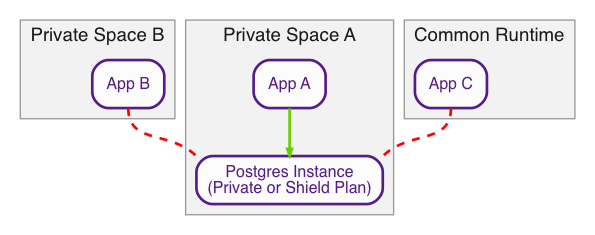
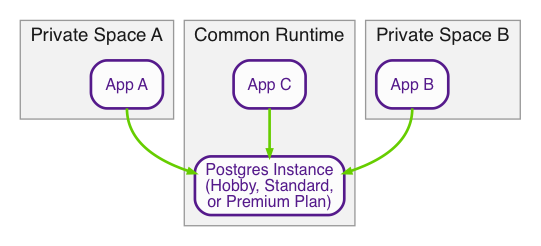
If you must connect to a database from a different Private Space or from the Common Runtime, you want a database instance with a non-private plan, which lives in the Common Runtime.
You can also use mTLS to connect to a database from a different private space. See Connecting to a Private or Shield Heroku Postgres Database from an External Resource for details.
If you’re connecting to a database in one region from a private space in another region, there can be increased latency.
Connecting from a One-Off Dyno in the Space
You can access a Private or Shield database from a one-off dyno console in the database’s space. psql is installed by default in the different Heroku stacks and you can use it to connect to the database from a dyno.
Start a one-off dyno that runs the psql command with the connection string of your database:
$ heroku run 'psql $DATABASE_URL' -a example-app
Running psql $DATABASE_URL on ⬢ example-app... up, run.6995
psql (15.3 (Ubuntu 15.3-1.pgdg18.04+1), server 16.9 (Ubuntu 16.9-1.pgdg20.04+1))
SSL connection (protocol: TLSv1.3, cipher: TLS_AES_256_GCM_SHA384, compression: off)
Type "help" for help.

d9fm5ro65cprs0=>
Alternatively, you can start a one-off dyno with the bash command to start the shell, and then explore the different environment variables available to connect to the database you need with psql:
$ heroku run bash -a example-app
Running bash on ⬢ example-app... up, run.4953

~ $ env | grep postgres
DATABASE_URL=postgres://(...)
HEROKU_POSTGRESQL_TEAL_URL=postgres://(..)

~ $ psql $HEROKU_POSTGRESQL_TEAL_URL
psql (15.3 (Ubuntu 15.3-1.pgdg18.04+1), server 17.6)
SSL connection (protocol: TLSv1.3, cipher: TLS_AES_256_GCM_SHA384, compression: off)
Type "help" for help.

db3d6h3eloda95=>
Using the CLI
Unlike the Heroku Postgres databases in our other tiers, you can’t directly access Private and Shield databases from outside their space with psql or other database clients.
For access to a private plan Heroku Postgres database, you can use heroku data:pg:psql or heroku pg:psql. This command ensures that you have the correct authorization to connect to the Private database across the isolated network boundary and establishes a secure connection.
For access to a shield plan Heroku Postgres database, you can’t use heroku data:pg:psql or heroku pg:psql. See Connecting from a One-Off Dyno in the Space or Connecting via mTLS for alternatives to connect to your Shield database from outside of your Shield space.
Trusted IPs for Data
Trusted IPs for Data is a beta feature.
If you must make a direct connection to a Heroku Postgres private plan database from outside the Private Space boundary, use the Trusted IPs feature of Private Spaces to enable the connection. To use Trusted IPs for direct connections, Heroku must allowlist your Private Space to enable the functionality.
Open a support ticket to discuss use cases and ability to have your space included in the beta. See more details on Trusted IPs for data services Heroku Postgres, Heroku Key-Value Store, and Apache Kafka on Heroku in the Private Spaces documentation.