Skip Navigation
Heroku Dev Center Dev Center
  • Get Started
  • Documentation
  • Changelog
  • Search
Heroku Dev Center Dev Center
  • Get Started
    • Node.js
    • Ruby on Rails
    • Ruby
    • Python
    • Java
    • PHP
    • Go
    • Scala
    • Clojure
    • .NET
  • Documentation
  • Changelog
  • More
    Additional Resources
    • Home
    • Elements
    • Products
    • Pricing
    • Careers
    • Help
    • Status
    • Events
    • Podcasts
    • Compliance Center
    Heroku Blog

    Heroku Blog

    Find out what's new with Heroku on our blog.

    Visit Blog
  • Log in or Sign up
Show nav
View categories

Categories

  • Heroku Architecture
    • Compute (Dynos)
      • Dyno Management
      • Dyno Concepts
      • Dyno Behavior
      • Dyno Reference
      • Dyno Troubleshooting
    • Stacks (operating system images)
    • Networking & DNS
    • Platform Policies
    • Platform Principles
    • Buildpacks
  • Developer Tools
    • AI Tools
    • Command Line
    • Heroku VS Code Extension
  • Deployment
    • Deploying with Git
    • Deploying with Docker
    • Deployment Integrations
  • Continuous Delivery & Integration (Heroku Flow)
    • Continuous Integration
  • Language Support
    • Node.js
      • Node.js Behavior in Heroku
      • Troubleshooting Node.js Apps
      • Working with Node.js
    • Ruby
      • Rails Support
        • Working with Rails
      • Working with Bundler
      • Working with Ruby
      • Ruby Behavior in Heroku
      • Troubleshooting Ruby Apps
    • Python
      • Working with Python
      • Background Jobs in Python
      • Python Behavior in Heroku
      • Working with Django
    • Java
      • Java Behavior in Heroku
      • Working with Java
      • Working with Maven
      • Working with Spring Boot
      • Troubleshooting Java Apps
    • PHP
      • Working with PHP
      • PHP Behavior in Heroku
    • Go
      • Go Dependency Management
    • Scala
    • Clojure
    • .NET
      • Working with .NET
  • Databases & Data Management
    • Heroku Postgres
      • Postgres Basics
      • Postgres Getting Started
      • Postgres Performance
      • Postgres Data Transfer & Preservation
      • Postgres Availability
      • Postgres Special Topics
      • Migrating to Heroku Postgres
      • Heroku Postgres Advanced (Limited GA)
    • Heroku Key-Value Store
    • Apache Kafka on Heroku
    • Other Data Stores
  • AI
    • Inference Essentials
    • Inference API
    • Inference Quick Start Guides
    • AI Models
    • Tool Use
    • AI Integrations
    • Vector Database
  • Monitoring & Metrics
    • Logging
  • App Performance
  • Add-ons
    • All Add-ons
  • Collaboration
  • Security
    • App Security
    • Identities & Authentication
      • Single Sign-on (SSO)
    • Private Spaces
      • Infrastructure Networking
    • Compliance
  • Heroku Enterprise
    • Enterprise Accounts
    • Enterprise Teams
  • Patterns & Best Practices
  • Extending Heroku
    • Platform API
    • App Webhooks
    • Heroku Labs
    • Building Add-ons
      • Add-on Development Tasks
      • Add-on APIs
      • Add-on Guidelines & Requirements
    • Building CLI Plugins
    • Developing Buildpacks
    • Dev Center
  • Accounts & Billing
  • Troubleshooting & Support
  • Integrating with Salesforce
    • Heroku AppLink
      • Getting Started with Heroku AppLink
      • Working with Heroku AppLink
      • Heroku AppLink Reference
    • Heroku Connect (Salesforce sync)
      • Heroku Connect Administration
      • Heroku Connect Reference
      • Heroku Connect Troubleshooting
    • Other Salesforce Integrations
  • Collaboration
  • Developing Apps with Teams

Developing Apps with Teams

English — 日本語に切り替える

Table of Contents [expand]

  • Joining a Team
  • Developing Apps
  • Adding Apps to a Team
  • Setting a Default Team
  • Transfer a Team to or from an Enterprise Account
  • Additional Reading

Last updated August 20, 2026

CLI flag names have been upgraded from --org to --team. --org commands are still compatible during this deprecation period.

Developing and deploying applications with a Heroku Team or an Enterprise Team is largely the same experience as doing so in your personal account. Git-based deploys, command-line scaling, and add-ons all behave as expected. However, as with account administration, there are a few additions to the experience to be aware of when working within a team.

Joining a Team

Teams centralize the management of users and roles. To join a Heroku Team or an Enterprise Team, an admin user must add you directly.

After you’re on a team, you can select it in the Heroku Dashboard to view its apps. The Heroku Dashboard shows all teams that you belong to in the sidebar.

Developing Apps

As a member of a team, you have the ability to list and access all apps in the team. You can select an app in the app list to view its basic details, including who can give you more permissions on the app.

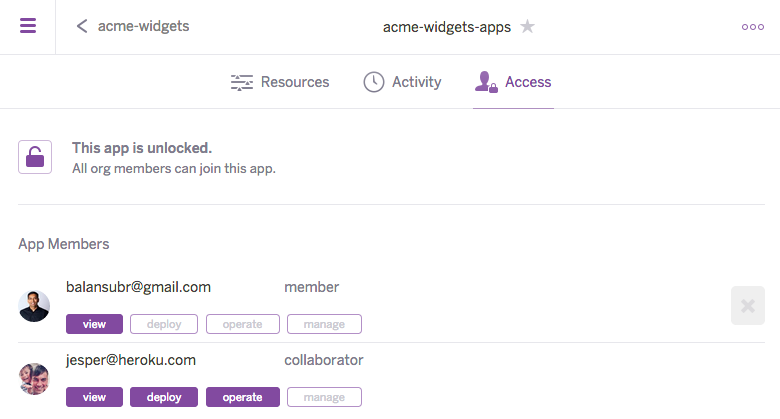
You need additional permissions on an app to deploy, scale, work with add-ons, and more. Going to an app’s Access tab shows you what access you have on the app. Team admins and users with manage permission on the app can grant you additional permissions.

In the CLI

To access apps in your team, you can list them by specifying the --team flag:

$ heroku apps --team acme-widgets
=== Apps in team acme-widgets
acme-website

To work with an existing app in the CLI, you must join the app first:

$ heroku join -a acme-website
Joining acme-website... done.

join happens automatically on the Heroku Dashboard.

Leaving an App

When you’re no longer working with an app regularly, you can leave the app. Leaving an app revokes all of your permissions on the app, but you can always select the app again to restore basic view access.

From the CLI, use the leave command:

$ heroku apps:leave --app acme-website
Leaving application acme-website... done

Or, in the Heroku Dashboard, go to the Access tab of the app and remove yourself from the list of members.
Adding Apps to a Team

If you have existing apps you’re developing under your personal account, you must transfer them to your team for them to be considered part of the team and billed against it.

You can use the CLI to transfer apps to your team. In this example, acme-widgets is the team name and deep-spring-4274 is the app:

$ heroku apps:transfer acme-widgets --app deep-spring-4274
Transferring deep-spring-4274 to acme-widgets... done

You can also use the app settings page in the Heroku Dashboard to transfer app ownership.

You can also create apps directly in the team:

$ heroku create --team acme-widgets
Creating frozen-wave-4030 in organization acme-inc...done
http://frozen-wave-4030.herokuapp.com/ | git@heroku.com:frozen-wave-4030.git
Git remote heroku added

Setting a Default Team

The Heroku CLI defaults to using your personal account and requires the --team flag when performing team actions. If you generally work under a particular team, you can set the HEROKU_ORGANIZATION environment variable to default to that team.

$ export HEROKU_ORGANIZATION=acme-widgets
$ heroku apps
=== Apps joined in organization acme-widgets
frozen-wave-4030
salty-depths-3445

The default team doesn’t persist when you open a new shell, however. For that you can add this setting to your profile file. For Unix machines using bash, use ~/.bashrc. For Windows you can set environment variables on the Advanced tab of System in the Control Panel.

Transfer a Team to or from an Enterprise Account

If you have an existing Heroku Team that incurs charges to a payment card, you can transfer the team to your Enterprise account to consolidate billing. You can also request to migrate an Enterprise Team out of your Enterprise account. See Transfer Heroku Teams To and From Enterprise Accounts for more info.

Additional Reading

  • Heroku Team Roles and Allowed Actions
  • App Permissions
  • Managing App Permissions
  • Pipeline Ephemeral App Permissions
  • Managing Access in Enterprise Accounts

Feedback

Log in to submit feedback.

Information & Support

  • Getting Started
  • Documentation
  • Changelog
  • Compliance Center
  • Training & Education
  • Blog
  • Support Channels
  • Status

Language Reference

  • Node.js
  • Ruby
  • Java
  • PHP
  • Python
  • Go
  • Scala
  • Clojure
  • .NET

Other Resources

  • Careers
  • Elements
  • Products
  • Pricing
  • RSS
    • Dev Center Articles
    • Dev Center Changelog
    • Heroku Blog
    • Heroku News Blog
    • Heroku Engineering Blog
  • Twitter
    • Dev Center Articles
    • Dev Center Changelog
    • Heroku
    • Heroku Status
  • Github
  • LinkedIn
  • © 2026 Salesforce, Inc. All rights reserved. Various trademarks held by their respective owners. Salesforce Tower, 415 Mission Street, 3rd Floor, San Francisco, CA 94105, United States
  • heroku.com
  • Legal
  • Terms of Service
  • Privacy Information
  • Responsible Disclosure
  • Trust
  • Contact
  • Cookie Preferences
  • Your Privacy Choices